I Benchmarked Python’s Concurrency Models So You Don’t Have To
Overview
There are 2 concurrency models that are quite common in the Python world. These are ThreadPool and ProcessPool. As the name suggests, the former spawns OS-level threads and manages the workload between them, while the latter spawns proper OS-level processes and distributes the work between them.
Usually, for CPU-bound workloads, ProcessPool is recommended (as the GIL prevents true parallel execution within threads) and for other types of workloads like memory-bound and I/O-bound (file access, network calls, etc), ThreadPool is preferred.
But there is one other lesser-known execution model which sits right in between these 2 : the InterpreterPool. This, roughly speaking, spawns multiple Python interpreters in the same process and apparently this this feature has existed in Python for the past 20 years or so but was available only as a C-API.
As this spawns its own Python interpreter, each instance gets its own GIL thus making multi-threaded workflows nearly parallel (sort of). But starting with Python 3.12, things improved significantly. Quoting from the docs :
… Think of multiple interpreters as threads but with opt-in sharing.
Regarding multi-core parallelism : as of Python 3.12, interpreters are now sufficiently isolated from one another to be used in parallel (see PEP 684). This unlocks a variety of CPU-intensive use cases for Python that were limited by the ~GIL.
Using multiple interpreters is similar in many ways to multiprocessing, in that they both provide isolated logical "processes" that can run in parallel, with no sharing by default. However, when using multiple interpreters, an application will use fewer system resources and will operate more efficiently (since it stays within the same process). Think of multiple interpreters as having the isolation of processes with the efficiency of threads.
Even Before Benchmarking, There Are A Few Things To Note
InterpreterPool is a fairly new (>= Python 3.14) feature and has very strict rules about things like imports, data sharing etc. Also, many libraries are not designed for subinterpreters and some C extensions may misbehave. So, although it’s available as part of concurrent.futures library, quite a bit of effort needs to be put into benchmarking before actually using this in production
1. Everything Must Be "Shareable" (Strict Serialization Rules)
Practical impact :
- You cannot pass functions defined in main
- You cannot pass lambdas, closures, bound methods
- You cannot pass complex objects freely
So, each worker runs in a separate subinterpreter, which means :
- No shared Python objects
- No shared module state
- Everything passed must be serializable in a restricted way
This is stricter than multiprocessing. And if we don’t follow this, we get the following error :
1NotShareableError: args not shareable
2. No Implicit Module Sharing
Practical impact :
- Globals are NOT shared
- Singletons don’t exist across interpreters
- Lazy imports inside workers are often required
3. The __main__ Must Be Used Carefully
Subinterpreters cannot reliably access things defined in main. So, as a general rule, anything executed in workers must live in an importable module. Not abiding by this gives :
1AttributeError: module '__main__' has no attribute 'abcdef'
4. Limited Object Types
Multiprocessing uses pickle, which is already restrictive. InterpreterPool goes further :
- Uses cross-interpreter data APIs
- Only allows "shareable" objects
These are typically safe :
int, float, str, bytes- tuples of primitives
- simple
dicts/lists(sometimes)
These are quite risky and often fails :
- class instances
- file handles
- sockets
- generators
- anything with internal state
Let’s Run The Benchmarks
Now that we have enough context about the different execution models, let us benchmark those. We will be using the following workloads :
 1def cpu_heavy(n: int) -> int:
 2    s = 0
 3    for i in range(n):
 4        s = i * i
 5    return s
 6
 7
 8def memory_heavy(n: int) -> int:
 9    arr = [i for i in range(n)]
10    return sum(arr)
11
12
13def io_heavy(size_mb: int) -> int:
14    data = "a" * (1024 * 1024)
15
16    with tempfile.NamedTemporaryFile(delete=False) as tmp:
17        filename = tmp.name
18        for _ in range(size_mb):
19            tmp.write(data.encode())
20
21    total = 0
22    with open(filename, "r") as f:
23        for line in f:
24            total = len(line)
25
26    os.remove(filename)
27    return total
28
29
30def network_heavy(requests: int) -> int:
31    total = 0
32    for _ in range(requests):
33        with urllib.request.urlopen("https://example.com") as r:
34            total = len(r.read())
35    return total
Each workload will have 3 types of "loads" … namely, low, medium and high :
 1{
 2    "cpu": {
 3        "low": 5000000,
 4        "med": 20000000,
 5        "high": 80000000
 6    },
 7    "memory": {
 8        "low": 5000000,
 9        "med": 10000000,
10        "high": 30000000
11    },
12    "io": {
13        "low": 10,
14        "med": 50,
15        "high": 200
16    },
17    "network": {
18        "low": 1,
19        "med": 3,
20        "high": 5
21    }
22}
We could put everything in a single bench.py file but due to the above mentioned limitations, we need to split the workloads and the benchmarking scripts into a few files :
1# Since the workload imports have to be isolated, we have this in a file called
2# executor_utils.py
3from workloads import WORKLOADS
4
5def run_task(fn_name: str, arg):
6    return WORKLOADS[fn_name](arg)
We will be measuring the following metrics :
1{
2    "wall_time": "float",
3    "cpu_time": "float",
4    "throughput": "float",
5    "memory_mb": "float",
6    "gil_eff": "float"
7}
The benchmark script is fairly straightforward :
  1import os
  2import sys
  3import json
  4import time
  5import psutil
  6
  7from concurrent.futures import ThreadPoolExecutor, ProcessPoolExecutor
  8
  9try:
 10    from concurrent.futures import InterpreterPoolExecutor
 11    HAS_INTERPRETER = True
 12except ImportError:
 13    HAS_INTERPRETER = False
 14
 15from executor_utils import run_task
 16
 17
 18def get_total_cpu_time():
 19    proc = psutil.Process(os.getpid())
 20    total = proc.cpu_times().user + proc.cpu_times().system
 21
 22    for child in proc.children(recursive=True):
 23        try:
 24            t = child.cpu_times()
 25            total += t.user + t.system
 26        except Exception:
 27            pass
 28
 29    return total
 30
 31
 32def get_memory_mb():
 33    return psutil.Process(os.getpid()).memory_info().rss / (1024 * 1024)
 34
 35
 36def gil_efficiency(cpu_time, wall_time, workers):
 37    if wall_time == 0:
 38        return 0
 39    return cpu_time / (wall_time * workers)
 40
 41
 42def simulate(executor, fn_name, arg, num_tasks, workers):
 43    cpu_before = get_total_cpu_time()
 44    wall_start = time.perf_counter()  # more precise
 45
 46    with executor(max_workers=workers) as ex:
 47        futures = [ex.submit(run_task, fn_name, arg) for _ in range(num_tasks)]
 48        _ = [f.result() for f in futures]
 49
 50    wall_end = time.perf_counter()
 51    cpu_after = get_total_cpu_time()
 52    mem_after = get_memory_mb()
 53
 54    wall = wall_end - wall_start
 55    cpu = cpu_after - cpu_before
 56
 57    return {
 58        "wall_time": wall,
 59        "cpu_time": cpu,
 60        "throughput": num_tasks / wall if wall > 0 else 0,
 61        # NOTE: We are NOT using delta here as Python GC can reclaim memory asynchronously
 62        "memory_mb": mem_after,
 63        "gil_eff": gil_efficiency(cpu, wall, workers),
 64    }
 65
 66
 67def benchmark(run_dir: str):
 68    with open("config.json") as f:
 69        CONFIG = json.load(f)
 70
 71    base_path = os.path.join("results", run_dir)
 72    os.makedirs(base_path, exist_ok=True)
 73
 74    strategies = {
 75        "ThreadPool": ThreadPoolExecutor,
 76        "ProcessPool": ProcessPoolExecutor,
 77    }
 78
 79    if HAS_INTERPRETER:
 80        strategies["InterpreterPool"] = InterpreterPoolExecutor
 81
 82    workers = 4
 83    num_tasks = 4
 84
 85    results = {s: {} for s in strategies}
 86
 87    for s_name, executor in strategies.items():
 88        for w_name in CONFIG:
 89            results[s_name][w_name] = {}
 90
 91            for level, arg in CONFIG[w_name].items():
 92                print(f"{s_name} | {w_name} | {level}")
 93
 94                baseline = simulate(ThreadPoolExecutor, w_name, arg, 1, 1)
 95                res = simulate(executor, w_name, arg, num_tasks, workers)
 96
 97                res["speedup"] = baseline["wall_time"] / res["wall_time"] if res["wall_time"] > 0 else 0
 98                res["efficiency"] = res["speedup"] / workers
 99
100                results[s_name][w_name][level] = res
101
102    out_file = os.path.join(base_path, "results.json")
103    with open(out_file, "w") as f:
104        json.dump(results, f, indent=4)
105
106    print(f"\nSaved results to {out_file}")
107
108
109if __name__ == "__main__":
110    if len(sys.argv) < 2:
111        print("Usage: python bench.py <RUN_DIR>")
112        sys.exit(1)
113
114    benchmark(sys.argv[1])
Hmm, now that I think about it, I think I should've taken workers and num_threads from config.json but for now, let's roll with what we have 😅😅
Results
The full script for running benchmarking, plotting and consolidating the results can be found in this project's GitHub repo
System Information
| Property | Value |
|---|---|
| Operating System | macOS 14.6 |
| Architecture | arm64 |
| CPU | arm |
| CPU Cores | 8 (logical: 8) |
| Memory | 24.0 GB |
| Disk | 460.4 GB |
| Python Version | 3.14.0 |
Plots
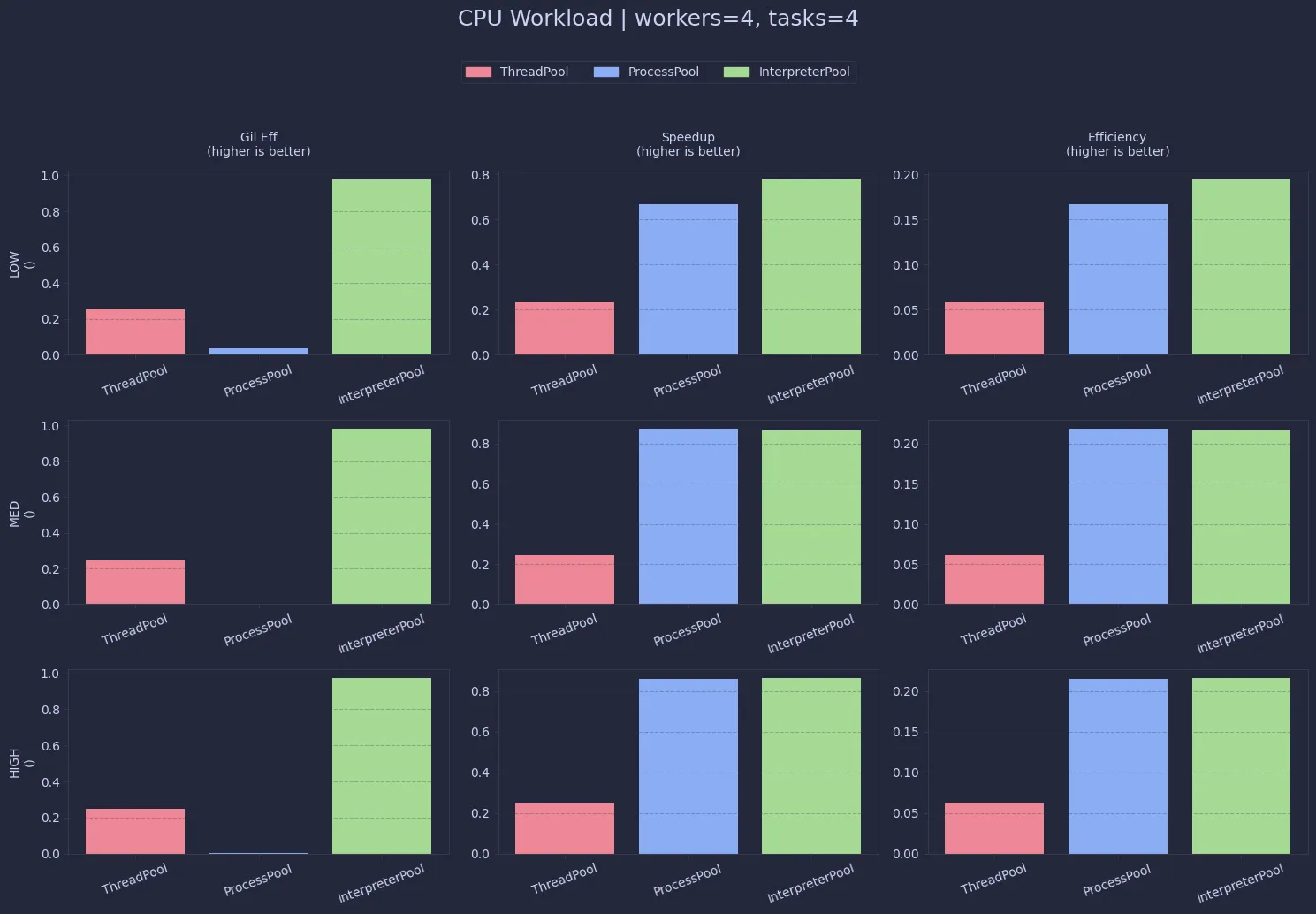
At first glance, this is exactly what you’d expect: ThreadPool sits around ~0.25 efficiency across all loads, which lines up with the GIL bottleneck (4 workers → ~1 core effectively used).InterpreterPool, however, is almost perfectly efficient (~0.99), which is surprisingly close to ideal parallelism. ProcessPool does achieve parallelism too, but the way CPU time is accounted here makes it look artificially low.
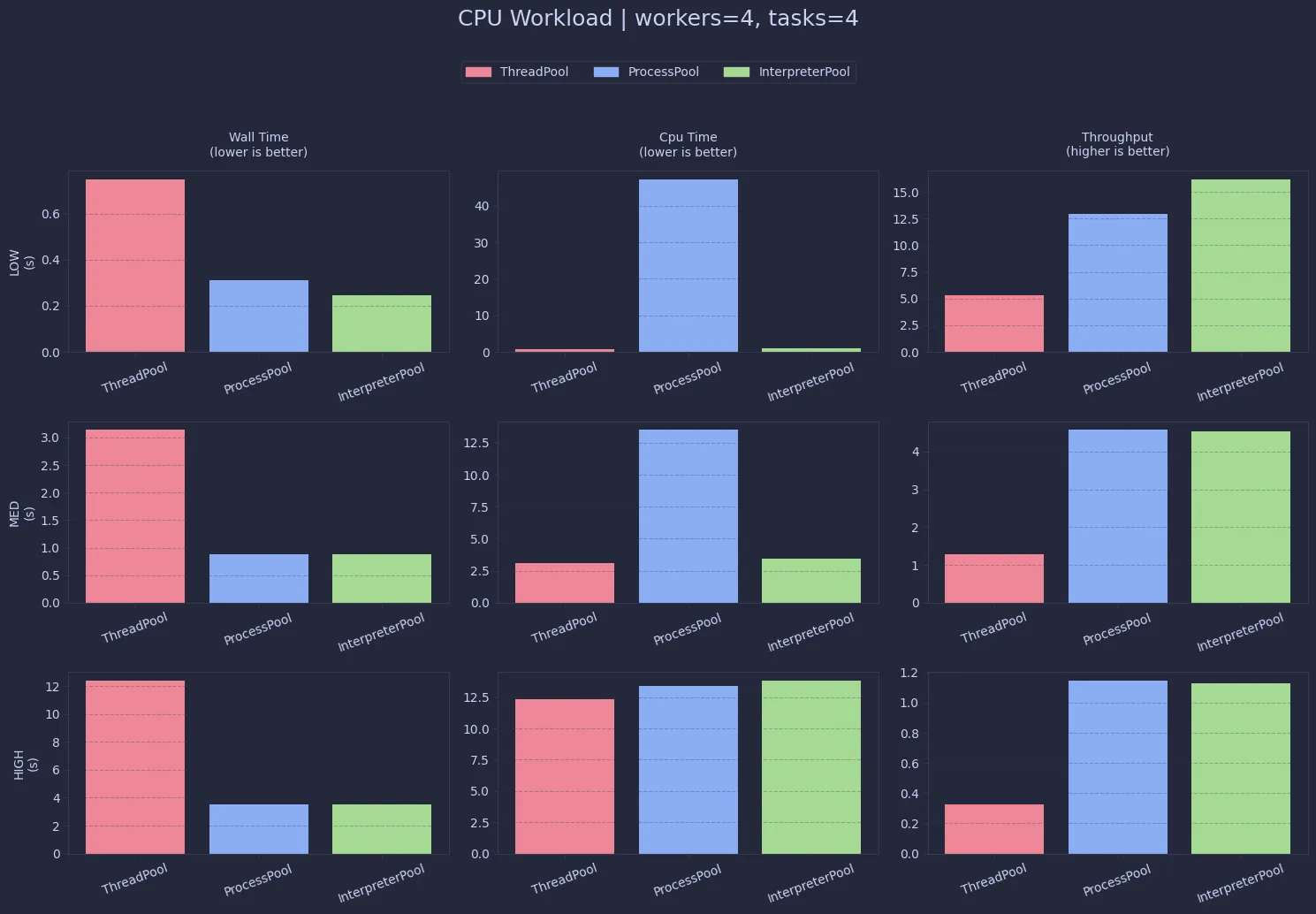
Performance-wise, both ProcessPool and InterpreterPool significantly outperform threads for CPU-heavy work.InterpreterPool edges slightly ahead in most cases, likely due to lower overhead compared to spawning full processes.
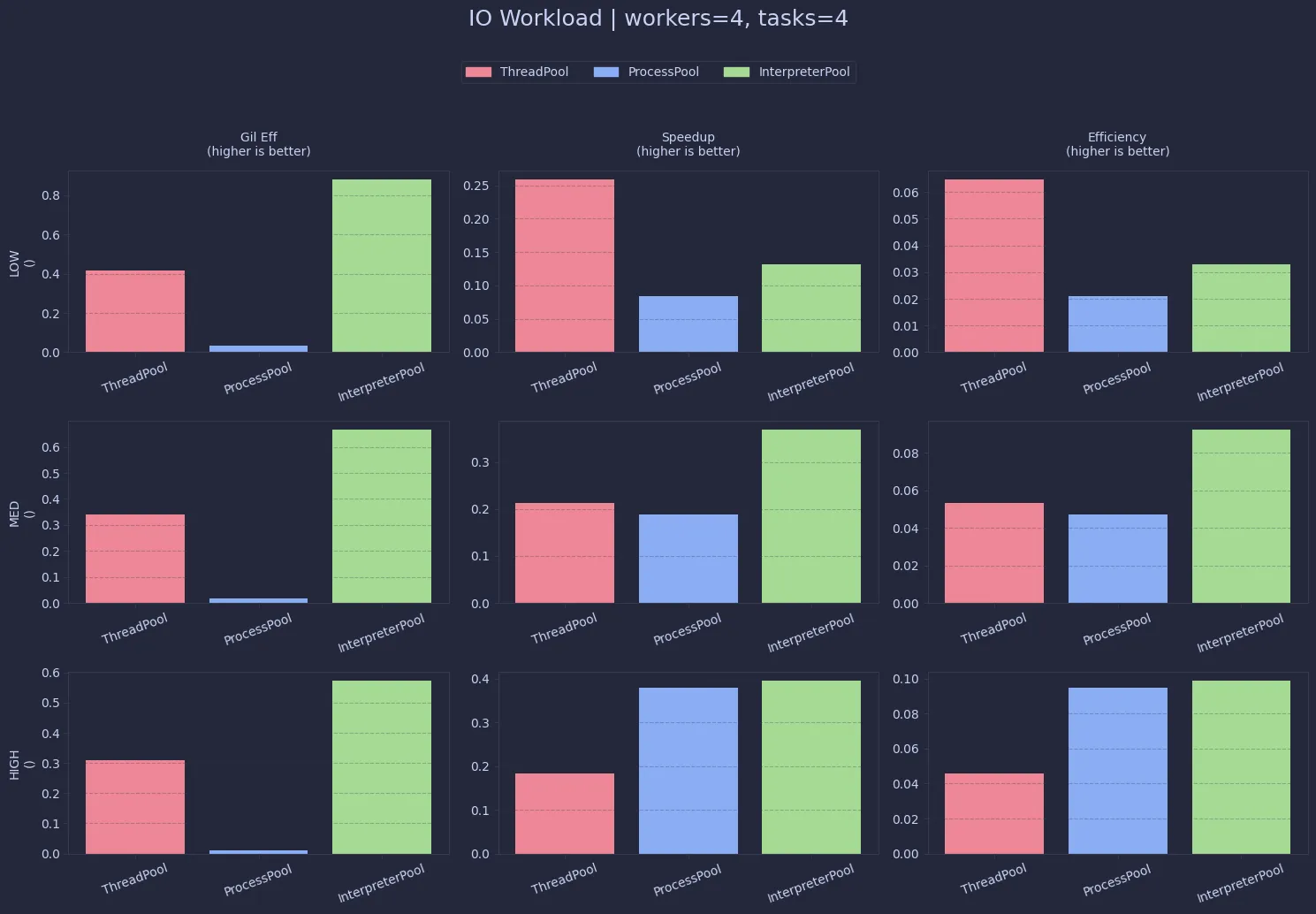
This is where things start to flip. Since I/O releases the GIL, ThreadPool performs much better here compared to CPU workloads.
Interestingly, InterpreterPool still shows decent efficiency, but that doesn’t necessarily translate to better real-world performance.
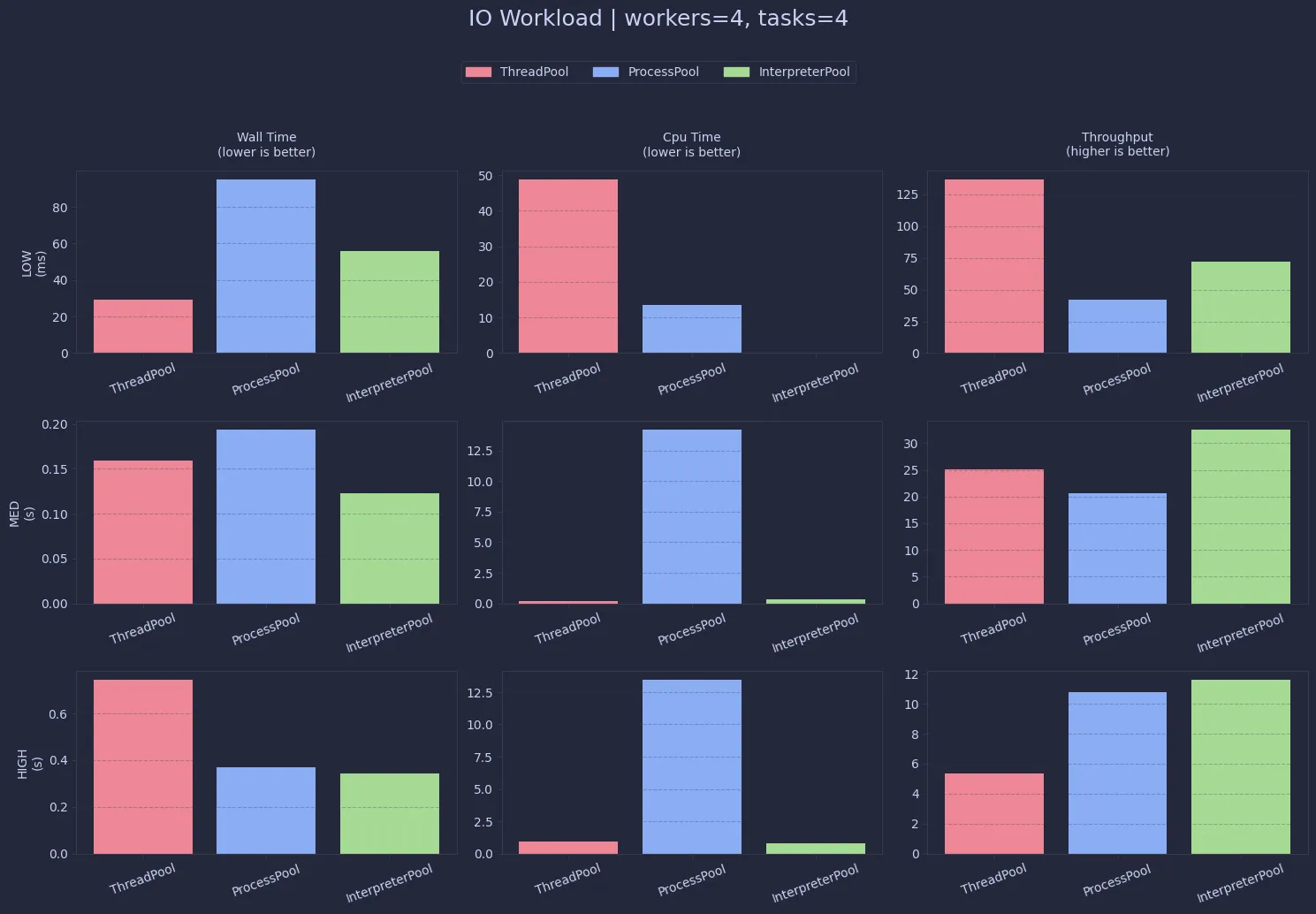
Despite lower “efficiency”, ThreadPool clearly dominates in raw throughput for I/O workloads.
The overhead of process and interpreter management starts to outweigh any parallelism benefits here.
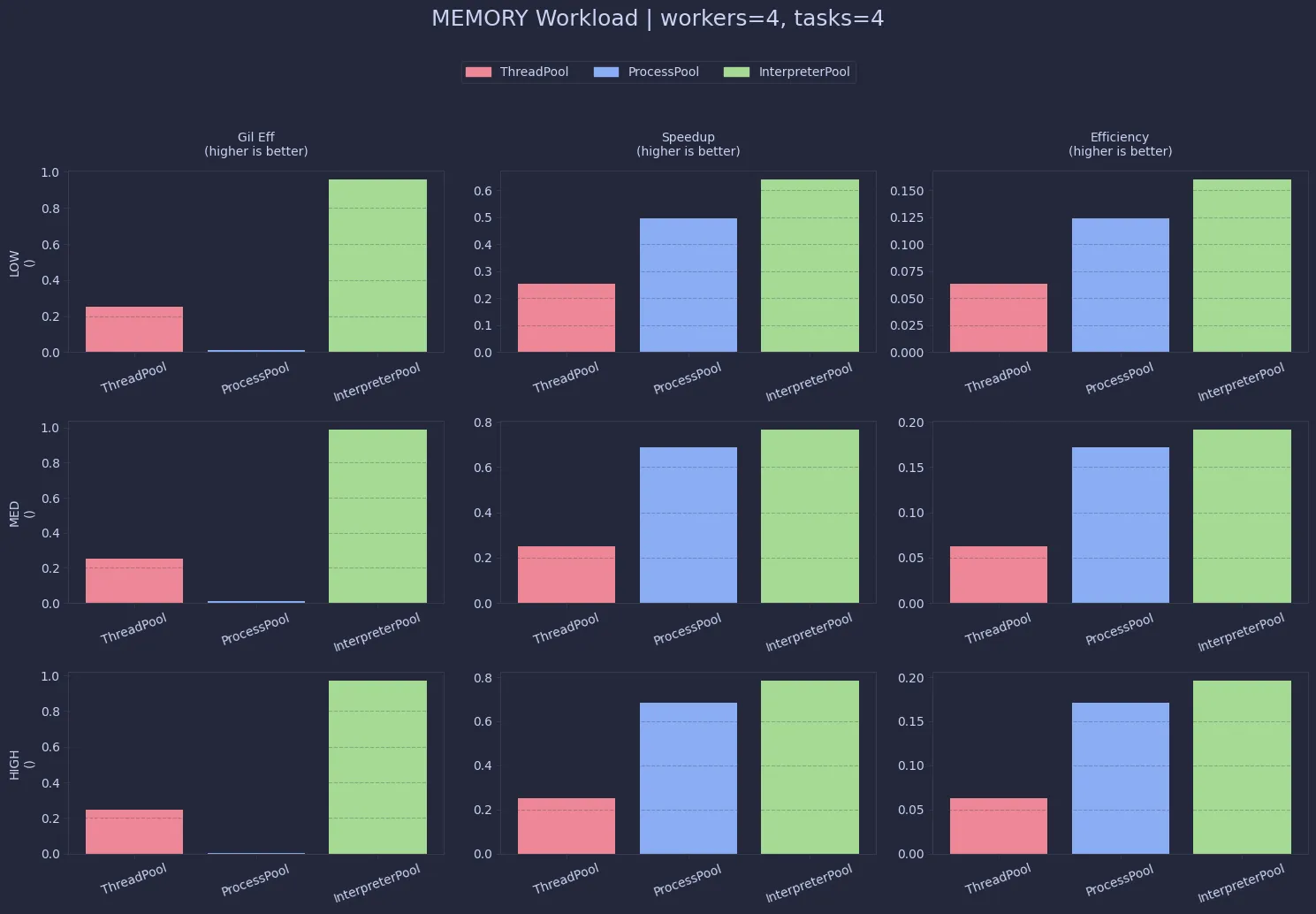
Memory-heavy workloads behave quite similarly to CPU-bound ones. ThreadPool remains constrained (~0.25), while InterpreterPool again achieves near-perfect scaling. ProcessPool works too, but with noticeably higher memory usage.
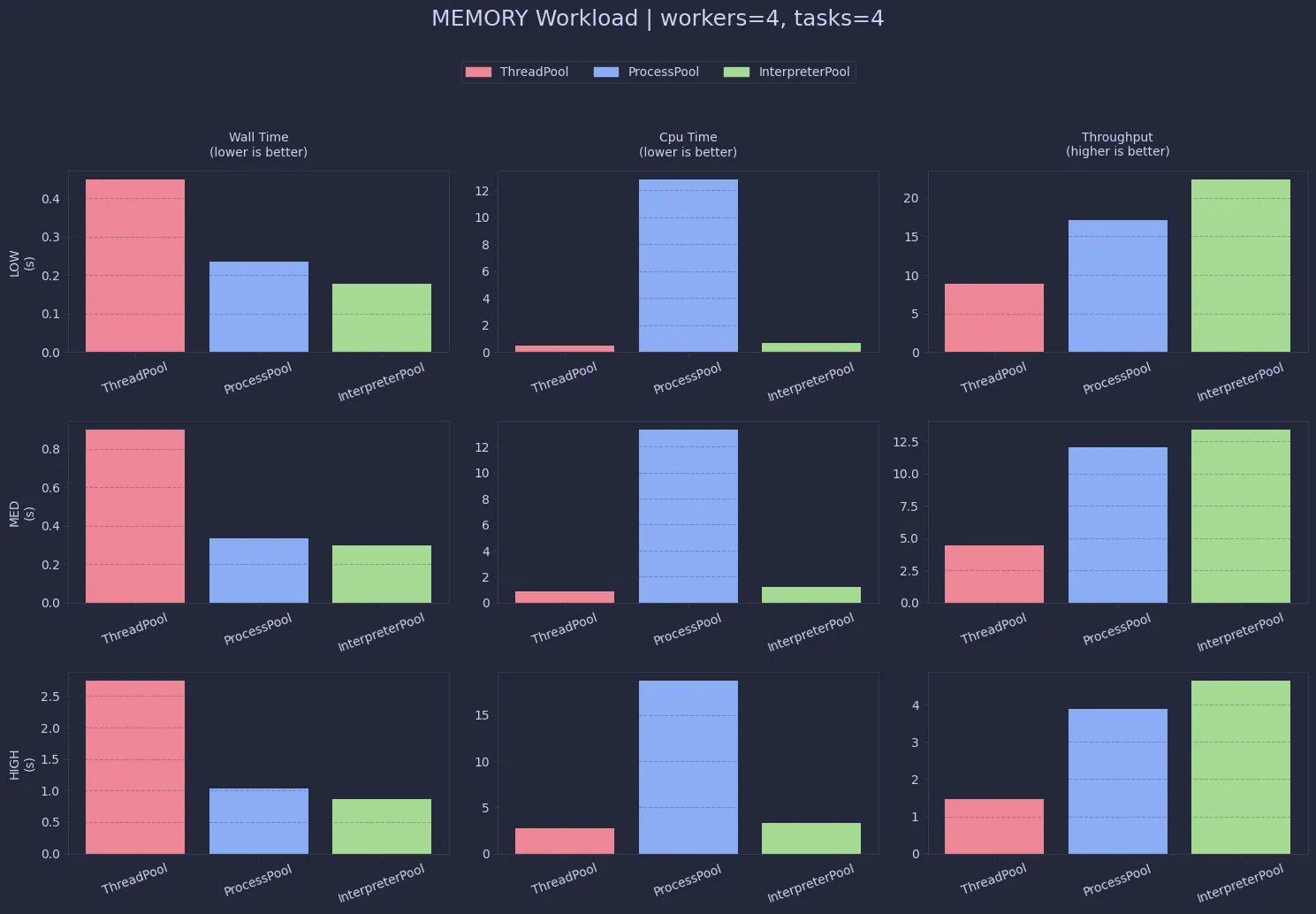
In terms of performance, InterpreterPool and ProcessPool are both strong here, with interpreters often having a slight edge. Threads lag behind due to the same shared-execution limitations.
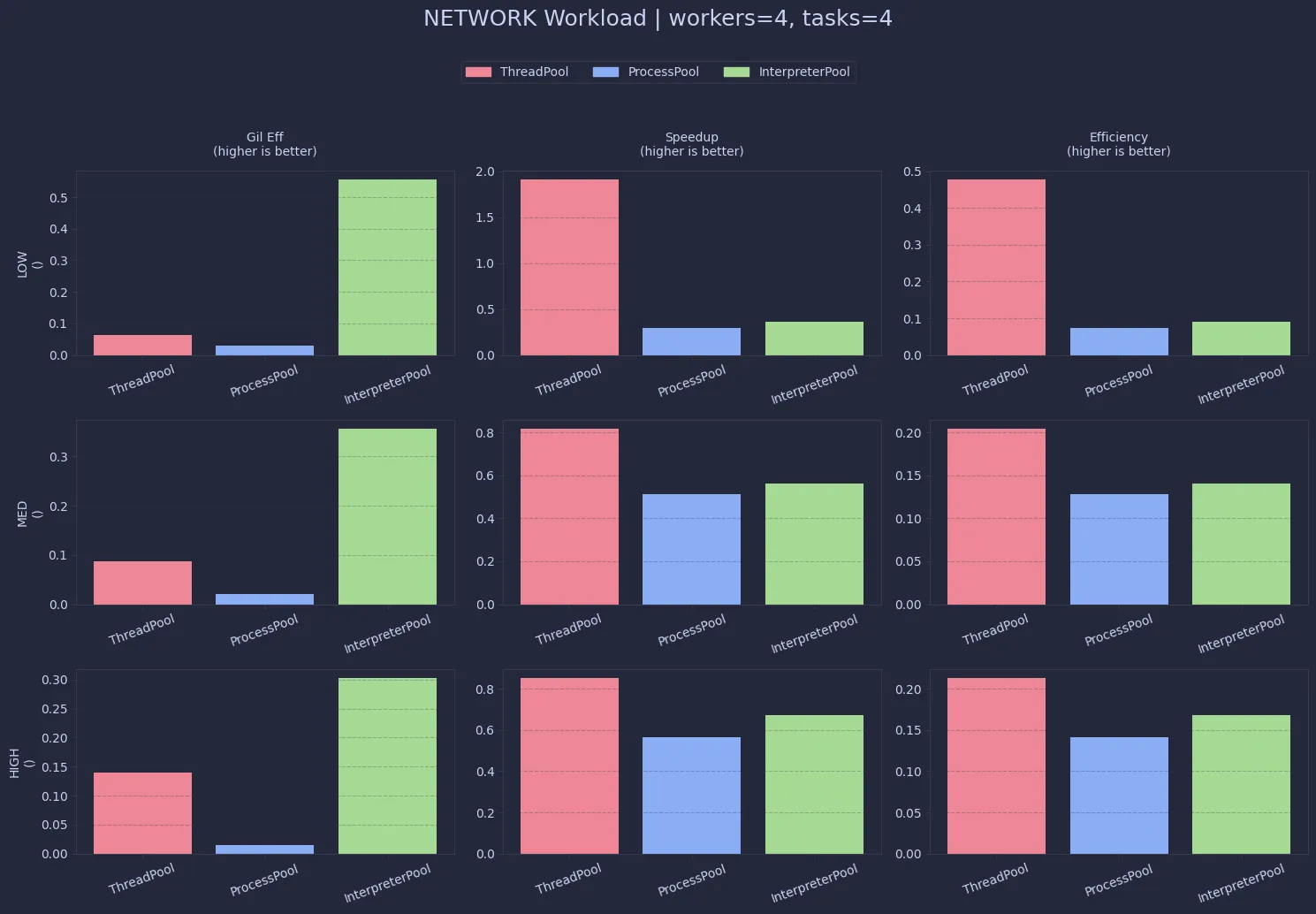
Network workloads are even more skewed toward ThreadPool. Since most of the time is spent waiting, threads overlap extremely well. The low GIL efficiency here is actually expected—it just means the CPU isn’t the bottleneck.
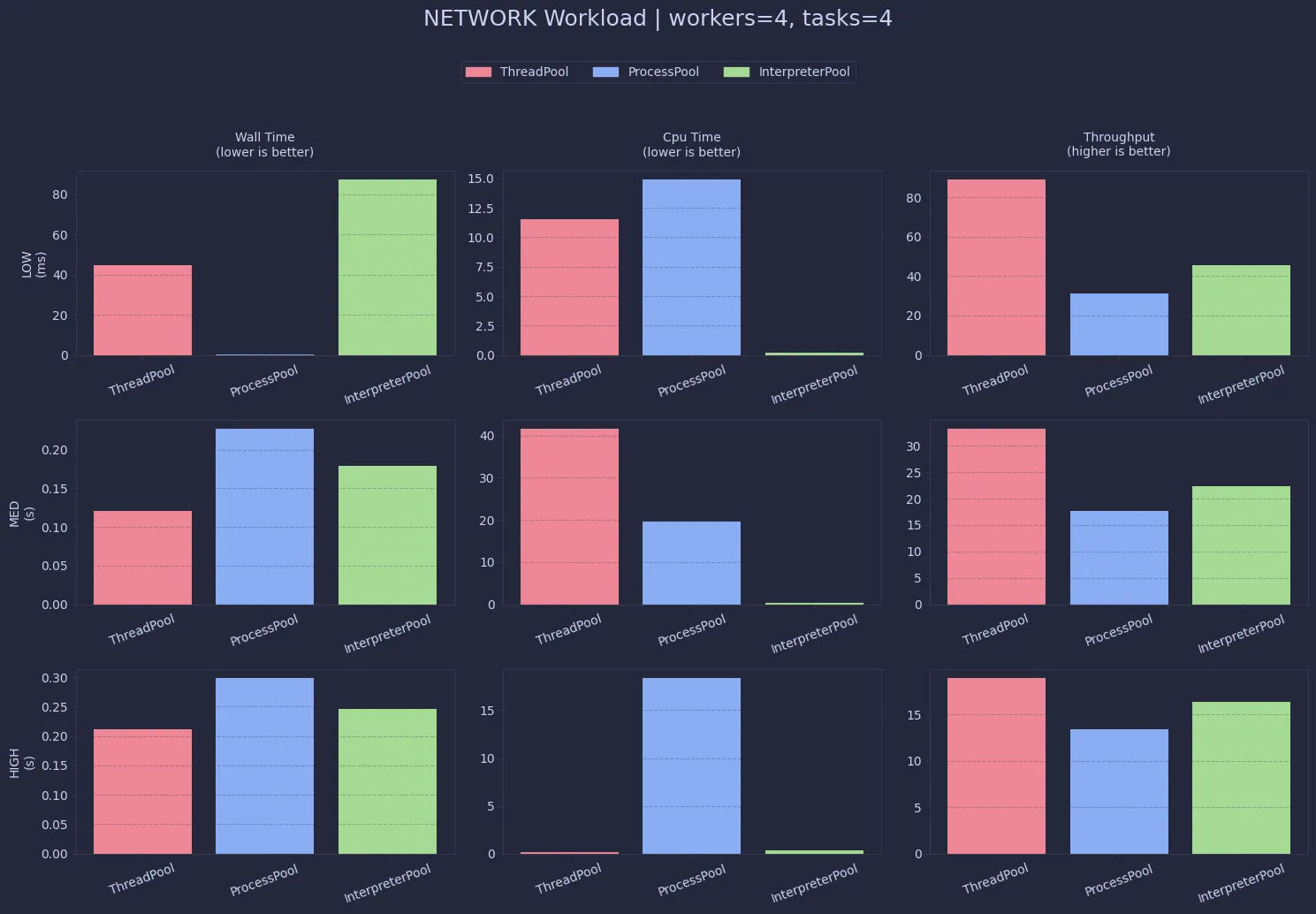
For real-world network-bound tasks, ThreadPool is hard to beat. Both ProcessPool and InterpreterPool introduce unnecessary overhead without offering meaningful gains.
So … What Should You Actually Use ?
After benchmarking these across CPU, memory, IO, and network workloads, the results are a lot more nuanced than the usual "GIL bad" narrative.
The short version : there is no universally "best" concurrency model in Python. Each one is optimized for a different kind of bottleneck.
For CPU-bound workloads :
- Threads simply don’t hold up well. The GIL forces them into effectively serial execution, which is clearly reflected in the low efficiency (~0.25 with 4 workers).
- Both
ProcessPoolandInterpreterPoolbypass this limitation, but InterpreterPool stands out as it achieves near-perfect GIL efficiency (~0.99) while avoiding some of the heavy overhead associated with multiprocessing - In practice, it delivers performance comparable to (and sometimes slightly better than) processes, making it a compelling modern alternative.
For memory-heavy workloads : (the story is largely similar)
- Threads still struggle due to shared execution constraints, while processes and interpreters scale better.
InterpreterPoolagain finds a middle ground : better parallelism than threads, and often less overhead than spawning full processes.
- Threads still struggle due to shared execution constraints, while processes and interpreters scale better.
But everything flips when you move to I/O and network-bound workloads.
- Here,
ThreadPooldominates. Since IO releases the GIL, threads can overlap execution efficiently without needing multiple processes or interpreters. The added overhead ofProcessPoolandInterpreterPoolactually becomes a disadvantage, making them slower despite their theoretical parallelism.
That said, InterpreterPool isn’t a silver bullet. It comes with stricter constraints around object sharing and serialization (oh the NotShareableError errors). It’s powerful, but not yet as ergonomic or battle-tested.
So, the old adage sort of remains true :
- If you’re doing heavy computation, avoid threads.
- If you’re doing IO, avoid processes.
But if you want a modern, high-performance middle ground for CPU workloads, InterpreterPool is absolutely worth exploring.
PS : I still can't get over the fact that this was there in Python for the past 20 years 😅👀
Comments